




Description
AirBar Touchscreen Sensor for 13.3 inch Windows 10 Laptops- Adds Touch Functionality to Your Laptop, Touch With A Finger, Glove, Paintbrush, Stylus, Designed for 13.3 inch Windows 10 Laptops, Power Source USB Bus-Powered, USB Type A Host Port -Black , Retail Box, Limited Lifetime Warranty
Product Overview
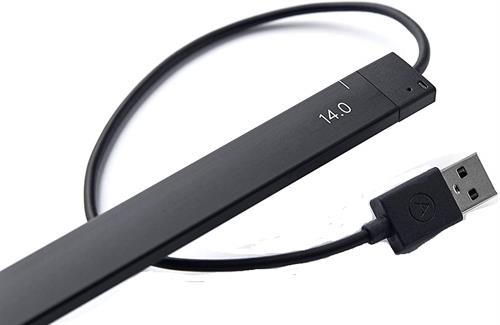
The Neonode AirBar Touchscreen Sensor for 13.3 inch Windows 10 based Laptops adds Touch enabled functionality to your standard Laptop. With this innovative laptop accessory you get the freedom to pinch, sweep, zoom and scroll on your laptop non-touch display screen to your heart’s content. Designed for Windows 10 Laptops with 13.3 inch 16:9 displays, the AirBar snaps onto the bottom of your laptop’s screen with the included magnets, and it connects to your system via an attached USB Type-A cable. Touch with a finger, glove, paintbrush, stylus, and more.
The Neonode AirBar Touchscreen Sensor for 13.3 inch Windows 10 based Laptops adds Touch enabled functionality to your standard Laptop. With this innovative laptop accessory you get the freedom to pinch, sweep, zoom and scroll on your laptop non-touch display screen to your heart’s content. Designed for Windows 10 Laptops with 13.3 inch 16:9 displays, the AirBar snaps onto the bottom of your laptop’s screen with the included magnets, and it connects to your system via an attached USB Type-A cable. Touch with a finger, glove, paintbrush, stylus, and more.
You need 22 mm of flat surface below the bottom edge of the display for mounting the AirBar sensor. Once connected, the AirBar senses touch inputs by emitting an invisible light field over your laptop’s screen, allowing you to interact with the display using your finger, a stylus, a glove, a paintbrush, or other compatible pointing devices. Supported gestures include tapping, swiping, pinching, zooming, and rotating. Thanks to its “Plug-and-Touch” functionality, the plug-and-play AirBar doesn’t require any drivers or software for installation.
System Requirements
Must be a 13.3 inch laptop/ Notebook with a 16:9 display and must be running Microsoft Windows 10
You need 22 mm of flat surface below the bottom edge of the display for mounting the AirBar sensor
Must be a 13.3 inch laptop/ Notebook with a 16:9 display and must be running Microsoft Windows 10
You need 22 mm of flat surface below the bottom edge of the display for mounting the AirBar sensor
Highlights
•Adds Touch Functionality to your standard 13.3 inch Laptop
•Simply attach the AirBar to the bottom of your 13.3 inch laptop screen with the included magnets
•Start tapping, swiping, and pinching on your laptop’s non-touch display
•Designed for Windows 10 based Laptops /Notebooks with 14 inch 16:9 displays
•Adds Touch Functionality to your standard 13.3 inch Laptop
•Simply attach the AirBar to the bottom of your 13.3 inch laptop screen with the included magnets
•Start tapping, swiping, and pinching on your laptop’s non-touch display
•Designed for Windows 10 based Laptops /Notebooks with 14 inch 16:9 displays
•You need 22 mm of flat surface below the bottom edge of the display for mounting the AirBar sensor.
•Touch With A Finger, Glove, Paintbrush, Stylus, And More.
•Accepts Gestures Like Taps, Swipes, Pinches, Zooms, And Rotations.
•USB Type-A Connector And USB Bus Powered
•Colour Black
•Touch With A Finger, Glove, Paintbrush, Stylus, And More.
•Accepts Gestures Like Taps, Swipes, Pinches, Zooms, And Rotations.
•USB Type-A Connector And USB Bus Powered
•Colour Black